

Choosing the right presentation tool can dramatically improve how your ideas are communicated. Whether you’re preparing a pitch deck, a lecture, or a visual report, your choice of software affects both your productivity and your audience’s engagement. In 2025, two names dominate the landscape: Canva and PowerPoint. But which one truly fits your needs?
Canva vs PowerPoint: Key Differences Between the Tools
Although both Canva and PowerPoint are capable of producing professional presentations, they are fundamentally different in their approach.
PowerPoint is a powerful desktop-based tool known for its deep feature set and integration with Microsoft 365. It’s the long-standing favorite for corporate teams, educators, and data-heavy workflows.
Canva, by contrast, is a web-based design platform optimized for speed, simplicity, and beautiful visuals. With thousands of ready-made templates and an intuitive drag-and-drop interface, Canva is built for marketers, freelancers, and creatives who value aesthetics and agility.
Canva: Fast, Visual, and Beginner-Friendly
Canva is cloud-native, meaning all your work is saved online and accessible from any device. There’s no software to install, and real-time collaboration is effortless.
Drag-and-Drop Simplicity
Even users with no design experience can build sleek, professional slides in minutes. The editor is visual and responsive, making it easy to add animations, graphics, video, or audio without leaving the platform.
Extensive Templates and Brand Consistency
With over 45,000 presentation templates, Canva offers more variety and freshness than most tools on the market. Users on Canva Pro can access the Brand Kit, which lets teams maintain consistent fonts, colors, and logos across all designs.
Multimedia Integration
From background music to embedded videos and GIFs, Canva supports a rich array of media types — a clear edge over PowerPoint’s more static style.
PowerPoint: Feature-Rich and Data-Driven
PowerPoint has long been the gold standard for structured, data-rich presentations. Its native compatibility with Excel, Word, and Outlook makes it an obvious choice for professionals in Microsoft ecosystems.
Offline Access and Output Control
Unlike Canva, PowerPoint works offline and offers flexible export options: PDF, image sets, or MP4 videos. You can even record voiceovers and animations directly in the app.
Advanced Charts and Equation Support
PowerPoint allows users to build complex graphs, link live Excel data, and insert math formulas using its built-in equation editor. This makes it ideal for academic, technical, or scientific presentations.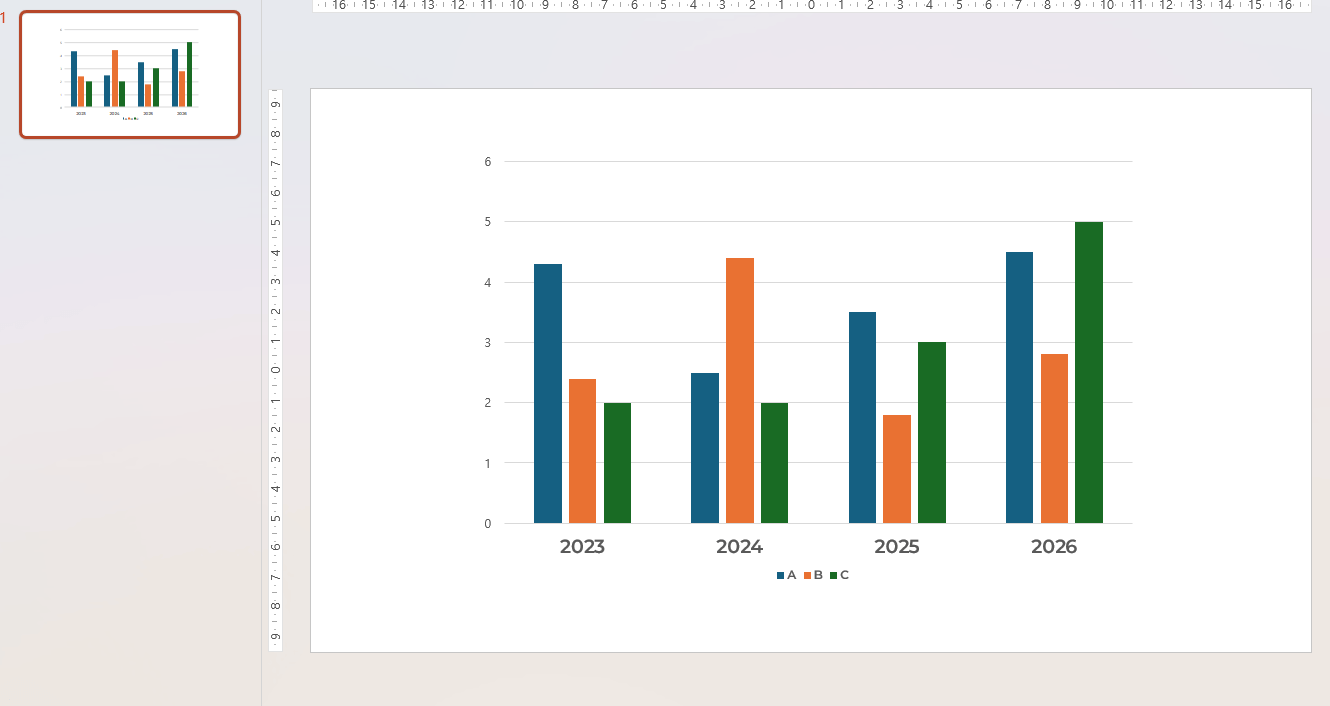
Canva vs PowerPoint: Which One Should You Use?
Choose Canva if you value speed, creativity, and a modern design aesthetic. It’s perfect for entrepreneurs, teachers, social media professionals, and anyone who needs to produce stunning visuals quickly.
Choose PowerPoint if your work involves spreadsheets, corporate branding, or advanced formatting. For long-format presentations with complex structures, PowerPoint is still the more powerful option.
Ultimately, the choice isn’t about which tool is objectively better — it’s about which tool fits your workflow.
Frequently Asked Questions about Canva PowerPoint Comparison
Is Canva better than PowerPoint for making presentations?
Yes — for most users who prioritize design, ease of use, and speed. Canva simplifies the creation process. However, PowerPoint is still better for data-driven, technical presentations.
Can Canva be used offline like PowerPoint?
No. Canva requires an internet connection to work. PowerPoint, on the other hand, can be fully used offline via the desktop app.
Does PowerPoint offer more templates than Canva?
No. Canva provides significantly more templates — over 45,000 — covering a wide variety of industries and design styles. PowerPoint includes about 70 basic templates by default.
Which tool is better for team collaboration?
Both tools support collaboration, but Canva’s real-time cloud sharing and Brand Kit features give it an advantage for creative and marketing teams. PowerPoint is better integrated for large organizations using Microsoft 365.
#canvapowerpoint


